
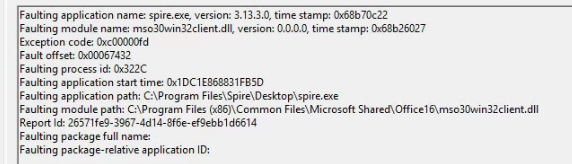
This article explains how to resolve Spire crashes during printing caused by references to mso30win32client.dll appearing in the Windows Event Viewer.
Overview
The file mso30win32client.dll is a Microsoft Office Dynamic Link Library (DLL). When this file is corrupted, outdated, or incompatible, it can cause Spire to crash unexpectedly. Resolving the issue typically involves repairing and updating Microsoft Office and Windows.
Repair Microsoft Office
Repairing Microsoft Office can restore missing or damaged DLL files that may be causing the crash.
Open Control Panel.
Navigate to Programs and Features.
Select Microsoft Office, then click Change.
Choose Quick Repair and complete the process.
If the issue persists, repeat the steps and select Online Repair instead.
Verify Office Version and Updates
Ensure Microsoft Office is correctly installed and fully updated to prevent compatibility issues.
Confirm that Microsoft Office 64-bit is installed.
Open any Office application and verify it is updated to the latest available version.
Make sure Windows Updates are fully installed and up to date.
Conclusion
Spire crashes referencing mso30win32client.dll are commonly caused by Office-related issues. Repairing Microsoft Office, confirming the correct Office version, and keeping both Office and Windows updated should resolve the problem.